Images tell the visual story of any business, especially on Google Business Profiles. They’re often the first thing potential customers notice, and well-optimized visuals can improve your engagement and help build trust.
It’s fair to say that images can make or break your Google Business Profile, hampering your trust, growth, and eventually your footfall.
In this guide, we shall discuss how to make your images stand out, add value, attract your potential clients, and improve your local reach.

Why Optimizing Your Images For GBP Matters?
We’re all aware that optimized images do more than just look nice—they help you attract your potential clients, keep your GBP in top-notch shape, and make sure your business is out there, getting noticed, and getting all the attention it deserves.
Higher Click-Through Rates
A good-looking, relevant image grabs attention and encourages clicks. People are naturally drawn to visuals, so a great image can make someone pause and want to learn more about your business.
Solid First Impressions
Crisp, high-quality images that load quickly send a signal of professionalism and quality. This simple step builds trust right away, making potential customers feel good about choosing your business over the competition.
More Engagement on Profiles and Socials
Visual platforms like Google Business Profiles and social media thrive on engaging images. A good image increases your likes, shares, and even conversions, creating a positive cycle of visibility and reputation.
Improves Local Relevance
For local businesses, images with location details and descriptive tags can increase your chances of showing up in “near me” searches, right where people are actively looking for options nearby.
When your customers have high-quality, fast-loading, and relevant images, they’re not just showing their best side. They’re also setting themselves up with a stronger online presence that turns viewers into loyal customers.
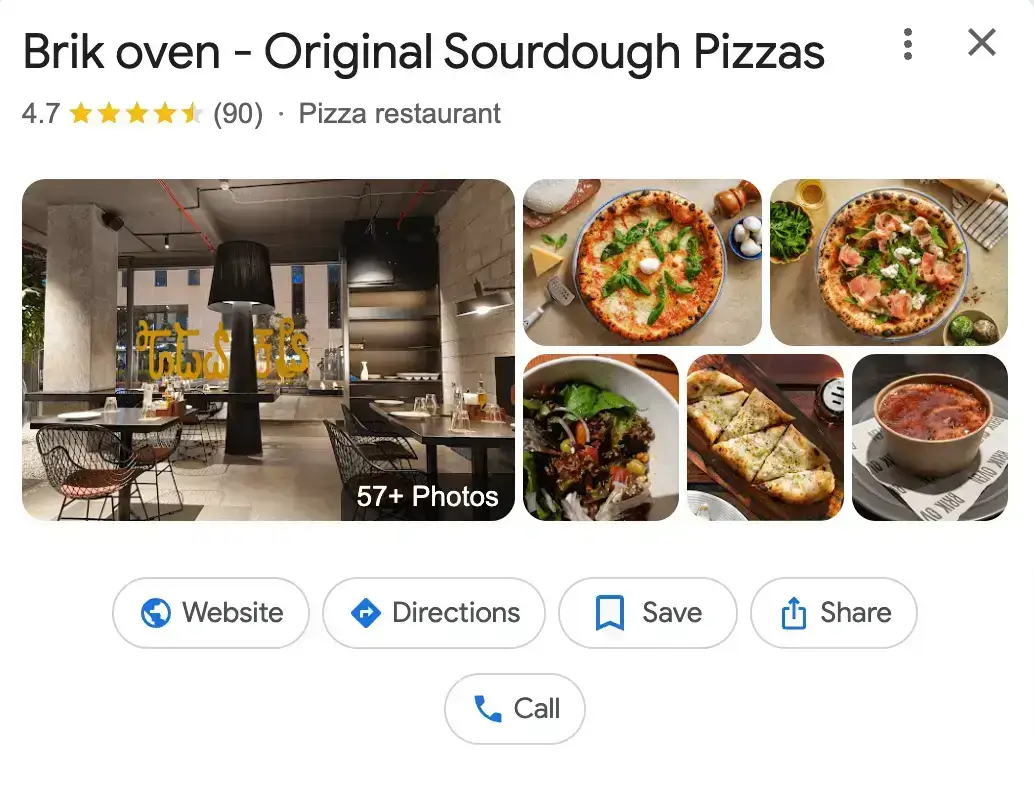
Image Types for Google Business Profile
Having the right types of images on a Google Business Profile can make a huge difference in how a business is perceived. Each image serves a unique role:
1. Profile Photo
The profile photo is often the first image customers will see. Typically, businesses use a logo as their profile photo. Keep it simple, clean, and consistent with branding across other platforms.
2. Cover Photo
The cover photo sets the tone for the entire listing. Choose a high-resolution image that represents the business’s core message or main service—a signature dish for a restaurant, or an inviting storefront for a boutique.
3. Additional Photos
Use additional photos to showcase products, team members, location shots, and customer interactions (with permission). Maintain variety, prioritize quality and realness, and keep the gallery up to date with seasonal or promotional updates.
Together, the profile photo offers instant brand recognition, the cover photo sets the tone, and additional photos fill in the details, helping potential customers feel more connected and informed.
Image Quality and Resolution
For a polished, professional look, use high-quality images. Google recommends a resolution of 720 x 720 pixels or higher, ideally in JPEG or PNG format. Clear, sharp photos help customers get a real sense of your business. Blurry or pixelated images can make a profile look sloppy and uninviting.
Some Do’s and Don’ts
- Do upload images that directly represent your business or location.
- Do share helpful, relatable photos that showcase what customers can expect.
- Do use real photos of your facilities, staff, and services.
- Do compress images to reduce load times without compromising quality.
- Don’t use stock images, especially those with over 10% text overlay.
- Don’t use overly Photoshopped or text-heavy images.
- Don’t slap your logo on every image—subtle branding is fine.
Following these tips will help your GBP images get approved while also making your profile more engaging and appealing to your audience.
Tracking Your Performance on GBP
GBP Insights provides useful data, like how many views or interactions your images receive. By analyzing this data, you can refine your image strategy to better connect with your audience.
1. Look at the Numbers
Track views and interactions to identify patterns. Are product photos getting more attention than team pictures? Do event-related images attract more engagement?
2. Test and Adjust
Try different types of photos—close-up shots, wide-angle views, lifestyle images, and seasonal content. Monitor how each performs over time.
3. Use the Right Tools
Pair GBP Insights with Google Analytics, Canva, and social media analytics to see how your visual content performs across platforms.
4. Keep It Fresh
Regularly update your image gallery with seasonal changes, new products, and current team photos. Google rewards profiles that stay active and up-to-date.
5. Ask Your Customers
Ask followers what they want to see more of, read comments that mention your photos, and encourage happy customers to share their own photos featuring your business.
Optimizing images for a Google Business Profile might seem like a small task, but it can make a big difference in how a business is perceived online. By following the tips in this guide, agencies and small businesses can ensure their clients’ profiles are visually appealing and equipped to deliver real results.
Synup makes it easier to manage and optimize Google Business Profiles at scale. With its user-friendly platform, agencies can quickly update images, ensure consistency across multiple listings, and track the impact of these changes. Book a demo now.